Your rotation,
read from the pixels.
Pixelcast plays your rotation for every spec: damage, tank and healer. Its Combat Info addon, which Pixelcast installs for you, draws the game state as pixels; Pixelcast reads them and presses your own key binds. All 40 specs, each with a tuned Pixelcast APL.
2 hours free with Discord. No card needed for the trial.
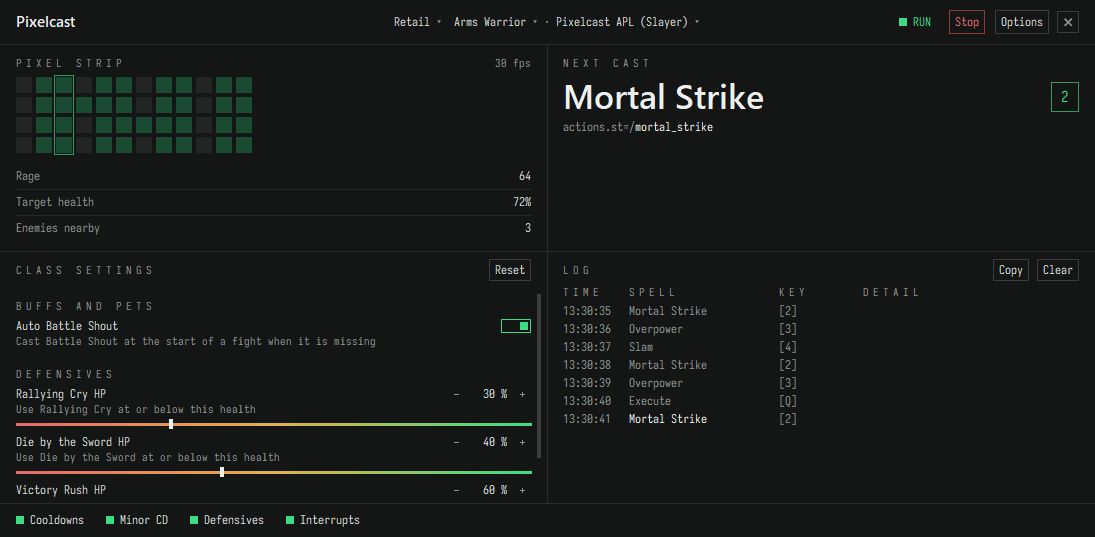
Arms Warrior · Actual app UI · Simulated sequence
How it works
Pixelcast never reads the game's memory and injects nothing into it. The addon paints pixels; Pixelcast looks at them and presses keys, as you would.
The addon paints the state
Pixelcast installs its Combat Info addon while WoW is closed (WeakAuras is optional). In game it draws cooldowns, buffs, resources and nearby enemies as a thin strip of coloured pixels along the top edge of WoW.
Pixelcast follows the APL
Many times a second it reads the cells and asks your spec's APL what to cast next, line by line, the way SimC does.
Your key binds do the rest
It presses the key you bound to that spell. Cooldowns, defensives, interrupts, potions and movement follow your toggles.
Every spec, every role
40 specs across 13 classes. Damage and tank specs come with a Pixelcast APL, healer specs with a Pixelcast healing profile; import or write your own APL any time. Pick a spec to see the spells it uses.
Built for playing
Set it up once per class, then play: Pixelcast starts by itself when WoW is in front. Stop and Start in Pixelcast pause and resume it at any time.
In-game bar
Type /ci show in WoW for an optional slim bar: RUN or PAUSED, with toggles for cooldowns, defensives, interrupts, potions and movement. /ci hide puts it away.
Class settings
Defensives at the health % you pick, buffs, pets and poisons. Set once per class.
Switch on the fly
Changed spec or character in WoW? Type /reload: Combat Info loads that spec and Pixelcast follows its saved profile. No reinstall, no WoW restart.
Updates itself
A new version installs when you switch class or spec, or at the next start. Never in the middle of a fight.
Help from facts
Send report uploads your last fights and gives you a short ID. Paste it in a Discord ticket and the fix starts from what happened.
Keys and mouse
Keyboard keys, mouse buttons and the mouse wheel all work, with or without Shift, Ctrl and Alt.
Pricing
Create a free account, then pay by card through Stripe. Time starts when the payment completes; buying again adds to what is left. Pixelcast runs on one PC.
No key to paste: install Pixelcast from your account and it links itself. Got a giveaway code? Redeem it in your account.
Troubleshooting
Look at the Logs panel in Pixelcast first: it says what is wrong.
"Windows protected your PC"
Click More info, then Run anyway. If your antivirus removed Pixelcast (SvcMon-….exe) or its update, restore it, move it (keep its name) into a folder of its own, for example Documents\Pixelcast, and allow only that folder and %LOCALAPPDATA%\APLRunner, where updates are prepared. Do not exclude your whole Downloads folder.
"Not linked", "Your time has run out" or "Time revoked"
Not linked: open Options › Licence › Sign in with the browser. Time ran out: buy more in your account, then go back to Pixelcast or click Refresh; no restart needed. "Licence check error": check your internet connection, then restart Pixelcast. Revoked: open a ticket on Discord.
"Companion not installed" or "Please close WoW"
Pixelcast installs its Combat Info addon only while WoW is closed. Close WoW, then click Options › Game › Install addon (or restart Pixelcast with WoW closed): it installs Combat Info for all 40 specs. Then start WoW again. If Pixelcast cannot find WoW, choose World of Warcraft\_retail_\Interface\AddOns when it asks. WeakAuras is needed only if you chose WeakAuras in Options › Game › Companion.
"Paused: WoW not focused"
Click into WoW: Pixelcast only presses keys while WoW is in front, and resumes by itself when it is. Stop and Start in Pixelcast pause and resume it at any time (in game: RUN on the optional bar, /ci show).
"Pixelcast lost the addon's pixel strip"
Keep WoW's top-left corner free of windows and overlays, keep the UI shown (Alt+Z hides it) and enemy nameplates on (V), and turn off HDR, Night light and colour filters.
"Not on your action bars"
Put those spells on an action bar with a key bind. Pixelcast only presses spells you could press yourself.
Still stuck?
Options › Support › Send report gives you a short ID like D-7K3F. Open a ticket in our Discord and paste it.
Questions
The short answers. More help on Discord.
Does it read game memory or inject code?
No. Its companion is Pixelcast's Combat Info addon (or a WeakAuras aura, which is optional), and it only draws pixels. Pixelcast reads those pixels from the screen and presses the keys you bound.
What do I need?
Windows 10 or 11 and WoW retail (Midnight). Pixelcast installs its own Combat Info addon; WeakAuras is not needed. Put your spells on action bars with key binds (healers: the addon sets up its own target and cast bindings, no macros needed), keep WoW's top-left corner uncovered, keep enemy nameplates on and turn off HDR, Night light and colour filters.
Tanks and healers?
Yes. All six tank specs have an expert Pixelcast APL and all seven healer specs have a Pixelcast healing profile. Automatic party/raid healing is on by default (Class settings turns it off). Dispels and big group cooldowns are automatic too: the Dispel and Cooldowns toggles on the in-game bar (/ci show) switch them off. Atonement damage, Spiritbloom and other major cooldowns stay manual.
What does Pixelcast send?
The licence check sends this PC's account link and a one-way ID made from Windows' machine ID, the same for every account on that PC. On an error it sends a small anonymous report without character names. Send report only uploads when you click it. Reports are deleted after 30 days. Details in the privacy notice.
New PC?
Pixelcast runs on one PC at a time. Open Pixelcast on the new PC, sign in with the browser and choose Move to this PC. Your time stays on the account.
Refunds?
Full refund within 14 days of buying if Pixelcast has not run on your PC since that purchase. Ask in a Discord ticket. Details in the terms.
Pixelcast is a third-party automation tool, not affiliated with or endorsed by Blizzard Entertainment. Using automation may break a game's terms of service; your account is your responsibility.
Join the Discord
Help tickets, custom APLs and your parses in #logs.